Glancing at your phone and having it instantly unlock has become such a normal part of daily life that it is easy to forget just how much sophisticated technology is working behind that split second moment. Facial recognition unlock relies on a genuinely impressive combination of specialized hardware and software working together to verify your identity quickly and securely. This article explains exactly how this technology actually works.
The Core Technology Behind Facial Recognition Unlock
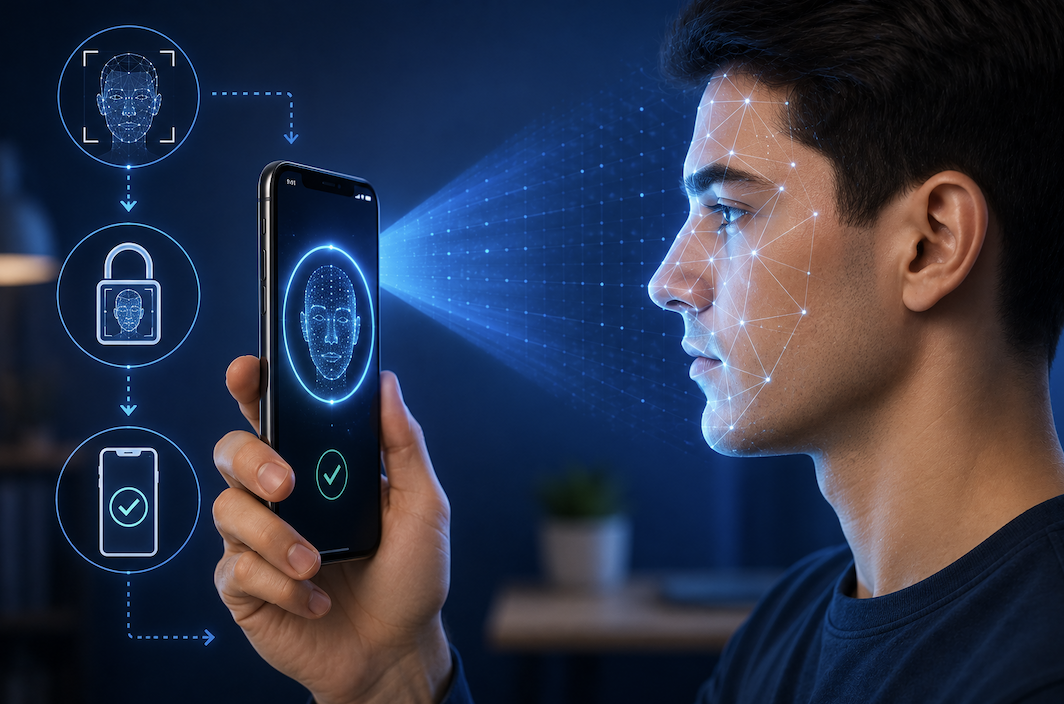
Facial recognition unlock uses a combination of cameras and specialized sensors to capture a detailed, three dimensional map of your face, rather than relying on a simple, flat photograph the way older, less secure systems once did. This three dimensional approach makes the system significantly harder to fool with a photo or video, since it captures actual depth and structure rather than just a two dimensional image.
When you first set up facial recognition on your phone, the device captures this detailed facial map and stores it securely, typically in a protected area of the phone’s hardware specifically designed to keep biometric data isolated from the rest of the operating system.
How the Sensors Actually Capture Your Face
Modern facial recognition systems typically combine several different sensor types to build an accurate, hard to fool three dimensional map of your face.
- An infrared camera captures details of your face even in low light conditions
- A dot projector casts thousands of tiny, invisible infrared dots onto your face
- A sensor reads how these dots deform across your face’s contours to map its exact shape
- A standard camera captures a traditional image to combine with this depth data
This combination allows the system to build a detailed depth map showing the precise contours of your face, including subtle details like the distance between your eyes and the shape of your nose and jawline, all captured in a fraction of a second.
How Your Phone Verifies Your Identity So Quickly
Once your phone captures this facial data during an unlock attempt, it compares the newly captured map against the securely stored reference map created during initial setup. This comparison happens using specialized processing hardware built directly into the phone, allowing the entire verification process to complete in a fraction of a second without needing to send any data to external servers.
- Newly captured facial data gets compared against your securely stored reference map
- Specialized on device hardware handles this comparison without needing internet access
- The verification process typically completes in well under a second
- Your actual facial data typically never leaves your device during this process
Why This Technology Is Difficult to Fool With Photos
Because facial recognition unlock relies on genuine three dimensional depth data rather than a flat, two dimensional image, simply holding up a photo or even a video of the phone’s owner typically fails to unlock the device. The system specifically looks for the depth and structure that only a real, physically present face would produce, making this a significantly more secure approach than older systems that only analyzed a standard camera image.
- Genuine depth mapping distinguishes a real face from a flat photo or video
- Some systems also check for subtle natural movement to further confirm a live person
- This depth based approach represents a significant security improvement over older 2D systems
- No security system is perfectly infallible, though modern facial recognition is genuinely robust
Practical Considerations for Using Facial Recognition Securely
- Set up a strong backup passcode in case facial recognition fails or becomes unavailable
- Be aware that close family resemblances can occasionally, though rarely, cause false matches
- Understand that facial recognition works best with adequate lighting for full accuracy
- Consider your personal comfort level with biometric data before relying on it exclusively
How This Technology Has Improved Since Its Earliest Versions
Early facial recognition systems on phones relied on a standard front facing camera analyzing a simple, two dimensional image, which proved considerably easier to fool, sometimes even with a printed photograph held up to the camera. This early vulnerability pushed manufacturers to invest heavily in the more sophisticated, depth sensing technology now standard on most modern devices offering facial unlock.
Beyond just security improvements, modern systems have also become noticeably better at recognizing your face under varied conditions, including gradual changes like new glasses, facial hair, or minor weight fluctuations, using machine learning to adapt its stored reference data gradually over time rather than requiring you to redo setup every time your appearance shifts slightly.
- Early 2D systems were considerably easier to fool than modern depth sensing technology
- Manufacturers responded to early vulnerabilities with genuine hardware improvements
- Modern systems adapt gradually to minor changes in your appearance over time
- Continued refinement has made facial recognition both more secure and more convenient
Final Thoughts
Facial recognition unlock combines specialized infrared sensors, dot projectors, and dedicated processing hardware to verify your identity in a fraction of a second, relying on genuine three dimensional depth data rather than a simple flat image. Understanding how this technology actually works helps explain both its impressive convenience and the genuine security considerations worth keeping in mind while using it daily.
As with any biometric security feature, it works best as one part of a broader security approach rather than your only line of defense. Pairing it with a strong backup passcode and keeping your device’s software updated ensures you get the full benefit of this genuinely clever technology without leaving any obvious gaps in your overall protection.
Frequently Asked Questions
1. Can facial recognition unlock be fooled by a photo of me?
Modern systems using genuine depth mapping technology are specifically designed to resist this, since a flat photo lacks the three dimensional structure the system is actually looking for during verification.
2. Does my phone store an actual photo of my face for facial recognition?
No, most modern systems store a mathematical representation of your face’s structure rather than an actual photo, and this data typically stays securely isolated on your device rather than being uploaded anywhere.
3. Why does facial recognition sometimes fail to unlock my phone?
Poor lighting, wearing a mask or sunglasses, or significant changes in appearance can occasionally cause the system to fail, which is why having a backup passcode remains genuinely important.
4. Is facial recognition unlock as secure as a fingerprint scanner?
Both are generally considered strong security options, though the specific implementation quality matters more than the underlying method itself, and using either alongside a strong backup passcode is recommended.