Every time you connect to the internet, whether through your home network or a public hotspot at a cafe, you are exposing a certain amount of information about yourself simply by being online. Your internet provider can see which websites you visit. Websites can see your approximate location. Anyone else sharing an unsecured public network with you could potentially see far more than that. A VPN was built specifically to address these exposures, and understanding exactly how it works helps you decide whether, and how, to actually use one.
What a VPN Actually Is
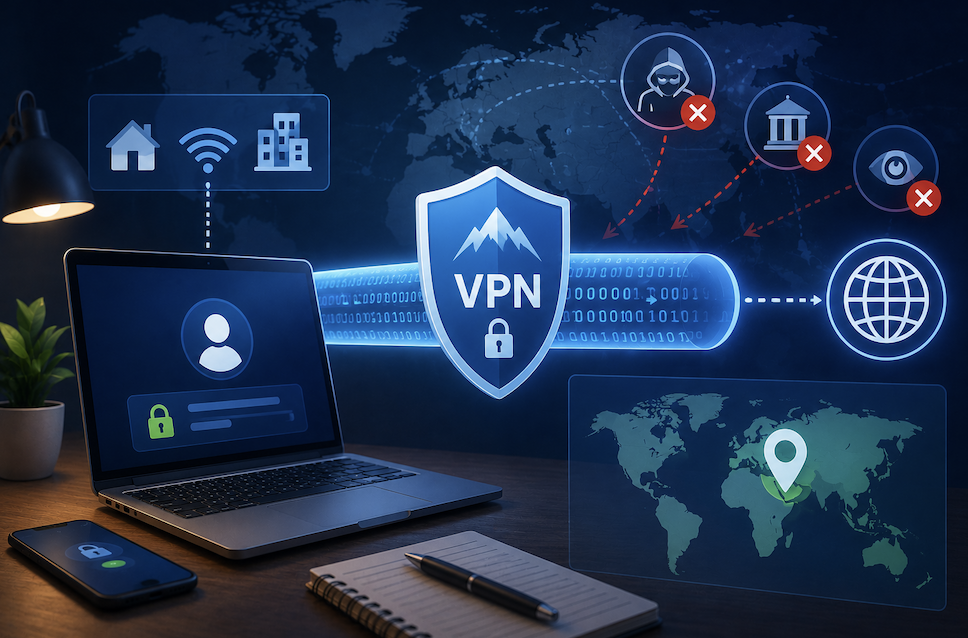
A VPN, short for virtual private network, creates an encrypted connection between your device and a remote server operated by the VPN provider. Instead of your internet traffic traveling directly from your device to the websites and services you use, it first passes through this encrypted tunnel to the VPN server, which then forwards your requests onward.
From the perspective of any website you visit, your traffic appears to originate from the VPN server rather than from your actual device, and your actual IP address, the unique identifier tied to your specific internet connection, stays hidden behind that server the entire time. This combination of encryption and IP masking is where the two genuine core benefits of using a VPN come from.
How the Encryption Piece Actually Protects You
The encrypted tunnel between your device and the VPN server means that even if someone else on the same network intercepted your data, whether that is a stranger on public Wi-Fi or your own internet provider, they would only see scrambled, unreadable information rather than your actual browsing activity, login credentials, or personal messages.
This matters most in situations where your connection is inherently less secure to begin with. Public Wi-Fi networks at coffee shops, airports, and hotels are notoriously easy environments for someone else on the same network to potentially intercept unencrypted traffic. A VPN’s encryption closes this gap by making your data unreadable regardless of who else might be sharing that same network connection.
- Encryption scrambles your data so intercepted traffic remains unreadable without the correct key
- Public Wi-Fi represents one of the highest-risk everyday situations a VPN genuinely helps with
- Your internet provider can see that you are using a VPN, but not the specific content of your encrypted traffic
- This protection applies to the connection itself, not to what happens after data reaches its destination
How IP Masking Actually Changes What Websites Can See
Beyond encryption, a VPN also hides your actual IP address from the websites and services you interact with. Since your traffic appears to come from the VPN server rather than your own device, websites see the VPN server’s location and IP address instead of your real one, which affects both your privacy and, in some cases, what content or pricing you are shown.
This IP masking is what allows VPNs to be used for accessing region-specific content, since a website might treat your connection as originating from whatever country your chosen VPN server happens to be located in, rather than your actual physical location. It is worth noting that using a VPN to access region-restricted content can sometimes violate the terms of service of certain platforms, even though using a VPN itself is completely legal in most countries.
- Websites see the VPN server’s IP address and location, not your actual one
- This affects targeted advertising, regional pricing, and access to geographically restricted content
- Using a VPN for this purpose may violate certain platforms’ terms of service, even where legal
- Your approximate physical location becomes considerably harder for websites to determine accurately
What a VPN Genuinely Does Not Protect You From
VPN marketing sometimes implies a level of total anonymity that does not reflect how the technology actually works, and understanding these limitations helps set realistic expectations rather than a false sense of complete invisibility online.
A VPN does not stop websites from tracking you once you are logged into an account, since your identity is directly tied to that login regardless of what IP address you are connecting from. It also does not protect against phishing attempts or malware that trick you into voluntarily giving up information, since these threats do not rely on intercepting your network traffic in the first place. Browser fingerprinting, a technique that identifies your device based on subtle characteristics like screen resolution and installed fonts, can also still track you across sites even with a VPN active.
- Logged-in account activity remains trackable regardless of your VPN connection
- Phishing and malware threats are unaffected by VPN encryption, since they exploit different
vulnerabilities - Browser fingerprinting can still identify and track your device across websites
- A VPN is one meaningful layer of protection, not a complete privacy solution on its own
Why Choosing a Reputable Provider Genuinely Matters
Not all VPN services offer the same level of actual protection, and this is a category where the specific provider you choose meaningfully affects whether you are getting genuine privacy benefits or simply handing your data to a different company instead of your original internet provider.
Free VPN services in particular deserve real scrutiny, since operating VPN server infrastructure costs real money, and a free service has to generate revenue somehow, sometimes through logging and selling user data, which directly undermines the privacy protection you were seeking in the first place. Reputable, paid VPN providers typically publish clear no-logging policies and, increasingly, submit to independent security audits that verify these claims rather than simply asserting them.
- Free VPN services sometimes generate revenue by logging and selling user data
- Reputable providers publish clear, specific no-logging policies rather than vague privacy claims
- Independent security audits provide meaningful verification beyond a company’s own marketing claims
- Server location variety and connection speed also matter for practical, everyday usability
Practical Situations Where a VPN Genuinely Adds Value
- Connecting to public Wi-Fi at coffee shops, airports, hotels, or any shared network you do not control
- Working remotely and needing to access company resources securely from outside the office
- Wanting to reduce the amount of browsing data your internet provider can directly observe
- Traveling and wanting to maintain access to services you normally use from home
Practical Situations Where a VPN Offers Limited Additional Benefit
- Browsing while already logged into accounts that track your activity regardless of IP address
- Expecting complete anonymity from all forms of online tracking, which a VPN alone cannot provide
- Using a free VPN service without understanding how that specific provider actually generates revenue
- Assuming a VPN protects against phishing, malware, or other threats unrelated to network interception
How VPN Protocols Affect Both Security and Speed
Behind the scenes, a VPN relies on a specific protocol, the underlying technical method it uses to establish and maintain that encrypted connection, and different protocols offer genuinely different trade-offs between security strength and connection speed. Most reputable VPN providers offer a choice between several protocols, and understanding the basic differences helps you choose intelligently rather than simply accepting whatever default option is selected.
Older protocols sometimes prioritize broad compatibility across many different devices and operating systems, while newer protocols often offer improved security and considerably better speed performance, having been designed more recently with modern hardware and encryption standards specifically in mind. Most people are well served by a provider’s recommended default protocol, though it is worth knowing this choice exists if you experience unexpectedly slow speeds or connection issues with your specific VPN setup.
- Different VPN protocols offer varying trade-offs between security strength and connection speed
- Newer protocols generally provide better performance, having been designed with modern standards in mind
- Most VPN providers offer a choice between several protocols within their app settings
- Switching protocols is a reasonable troubleshooting step if you experience unexpectedly slow VPN performance
Final Thoughts
A VPN provides two genuine, meaningful protections: encrypting your traffic so it cannot be easily intercepted, and masking your IP address so websites see the VPN server’s location rather than your own. Understanding both what it protects against and what it does not helps you use this tool as one thoughtful part of a broader approach to online privacy, rather than expecting it to serve as a single, complete solution to every privacy concern you might have.
- You May Want to Know What Two-Factor Authentication is and Why You Should Enable It Today!
Frequently Asked Questions
1. Does using a VPN slow down my internet connection?
Some speed reduction is common, since your traffic takes an additional route through the VPN server before reaching its destination, though reputable providers with well-optimized infrastructure typically keep this reduction minimal for most everyday browsing activities.
2. Can my employer see what I do online if I use a VPN on a work network?
If you are using a VPN provided and managed by your employer specifically for work purposes, they can typically still monitor activity on that connection, since it is their infrastructure. A personal VPN on your own device generally protects your traffic from your employer’s network visibility, though workplace policies vary.
3. Is it illegal to use a VPN?
In most countries, using a VPN is completely legal. A small number of countries do restrict or heavily regulate VPN use, so it is worth checking local laws specifically if you are traveling to or living in a country with stricter internet regulations.
4. Do I need a VPN if I only browse well-known, reputable websites?
Even reputable websites do not protect your traffic while it travels across the network itself, particularly on unsecured public Wi-Fi, which is exactly the specific risk a VPN’s encryption is designed to address regardless of which websites you ultimately visit.
5. Should I leave my VPN turned on all the time?
Many people do, particularly since modern VPN services have minimal impact on everyday browsing speed, though some choose to enable it selectively, particularly on public Wi-Fi or when accessing sensitive accounts like banking.