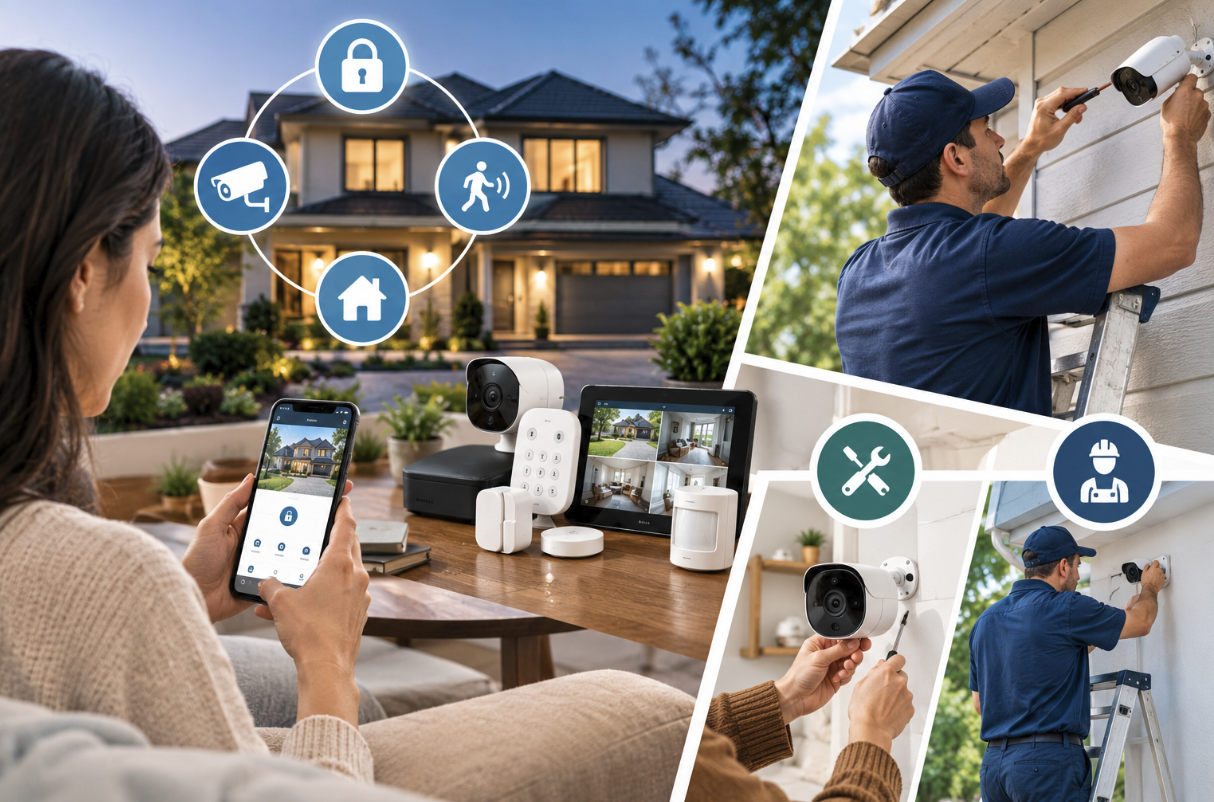
Deciding how to protect a home used to mean a single choice: sign a multi-year contract with a professional monitoring company or go without any system at all. That’s no longer the case. DIY systems from companies like Ring, SimpliSafe, and Wyze now compete directly with professionally installed and monitored setups from providers like ADT and Vivint, each with different trade-offs around cost, installation effort, and how quickly help arrives if something triggers an alarm.
This guide compares the two approaches and breaks down the components that make up a modern home security setup, so you can build a system that matches your budget and your home’s specific layout.
DIY Systems and What Self-Installation Involves
DIY security systems are designed to be installed by the homeowner without a professional technician, typically using adhesive mounts or simple screws for door and window sensors, plug-in base stations, and battery-powered cameras that connect over Wi-Fi. Setup usually takes an afternoon for a typical home, guided by a companion app that walks through pairing each sensor and camera to the base station.
Most DIY brands sell starter kits bundling a handful of door and window sensors, a motion detector, and a base station, with additional sensors and cameras available individually to expand coverage as needed. The appeal of a DIY system lies in flexibility and lower upfront cost. There’s no installation fee, no technician scheduling a visit, and no long-term contract required in most cases, since many DIY brands sell the equipment outright and offer monitoring as an optional add-on subscription rather than a bundled requirement.
The trade-off is that the homeowner is responsible for correct placement and troubleshooting, and a poorly placed sensor or camera can leave a real gap in coverage that a professional installer would likely have caught.
- Starter kits: Bundle a base station, a few door and window sensors, and often a motion detector at a lower combined price.
- Battery-powered cameras: Common in DIY setups, offering flexible placement without running wires, though requiring periodic battery changes.
- App-guided setup: Most systems walk users through pairing devices and testing sensors within the companion app.
- Expandable coverage: Additional sensors and cameras can be added individually as budget allows or needs change.
Professional Installation and Monitoring
Professionally installed systems typically involve a technician visiting the home to assess layout, recommend sensor and camera placement, and wire components either into the home’s electrical system or run dedicated low-voltage wiring for a hardwired setup. This tends to produce more reliable coverage since the installer has experience identifying blind spots and vulnerable entry points that an untrained homeowner might miss, and hardwired systems avoid the battery replacement upkeep that DIY setups require.
Professional monitoring means a monitoring center receives an alert the moment a sensor triggers and can contact emergency services on the homeowner’s behalf, which matters most when no one is home to notice an alert on their phone. This service typically comes with a monthly fee and, in many cases, a multi-year contract, which is the primary trade-off compared to a DIY system’s more flexible, often contract-free structure.
- Technician assessment: A professional evaluates entry points and recommends sensor placement based on the specific home’s layout.
- Hardwired components: Reduce reliance on batteries and tend to offer more consistent long-term reliability than wireless setups.
- 24/7 monitoring center: Staffed monitoring that can dispatch emergency services without the homeowner needing to respond to an alert.
- Contract terms: Many professional providers require a multi-year commitment, with an early termination fee if canceled before the term ends.
Core Components of a Complete System
Regardless of whether a system is DIY or professionally installed, most home security setups share a common set of components. Door and window sensors, typically a two-part magnetic sensor, detect when an entry point is opened while armed. Motion detectors cover open spaces like a living room or hallway, triggering an alert if movement is detected while the system is armed in “away” mode.
Cameras, both indoor and outdoor, add visual verification and often a recorded clip of any triggered event, which is useful both for reviewing what happened and for providing evidence if a break-in does occur.
Smart locks, video doorbells, and glass-break sensors round out a more complete setup, each addressing a specific vulnerability: smart locks allow remote locking and temporary access codes, video doorbells let you see and speak with whoever is at the door without opening it, and glass-break sensors detect the specific acoustic signature of a broken window even in a room without a motion detector or contact sensor covering that specific point of entry.
- Door and window sensors: Detect when an entry point opens while the system is armed.
- Motion detectors: Cover open interior spaces and trigger on movement while armed in away mode.
- Video doorbells: Provide two-way audio and video at the front door, often the most-used component in daily life.
- Glass-break sensors: Detect the sound frequency of breaking glass, covering windows without a dedicated contact sensor.
- Smart locks: Allow remote locking, unlocking, and temporary access codes for guests or service providers.
Weighing Monitoring Fees and Contract Terms
Monthly monitoring costs vary widely depending on whether you choose self-monitoring, where alerts go only to your phone, or professional monitoring, where a staffed center responds to alerts and can dispatch help. Self-monitoring plans are typically cheaper or even free with some DIY brands, though they place full responsibility on the homeowner to notice and respond to an alert, which isn’t practical if you’re asleep, at work without phone access, or traveling without reliable service.
Professional monitoring plans generally cost more per month but add the reliability of a staffed response team. Some DIY brands, including SimpliSafe and Ring, now offer professional monitoring as an optional upgrade without requiring a long-term contract, which blurs the line between the DIY and professional categories and gives homeowners a middle path that wasn’t widely available a few years ago.
Insurance Discounts and Return on Investment
Many homeowners insurance providers offer a discount, typically in the range of five to twenty percent, for having a monitored security system in place, which can offset a real portion of the ongoing monitoring cost over time. Confirming the specific discount available and the documentation required, often proof of professional monitoring rather than a self-monitored DIY setup, is worth doing before assuming a system will pay for itself through insurance savings alone.
Beyond insurance discounts, the deterrent effect of visible cameras and yard signs is difficult to measure precisely, but studies on burglary patterns generally suggest that visible security measures shift risk toward homes without them, since burglars tend to prefer lower-effort, lower-risk targets. A system’s value, then, comes from a combination of deterrence, faster response if something does happen, and the peace of mind of remote monitoring while away from home.
Choosing Based on Your Home’s Layout

A small apartment with one or two entry points has different security needs than a large house with a yard, a garage, and multiple stories. Apartment dwellers often do well with a simple DIY kit covering the front door and any ground-floor windows, paired with a video doorbell if the building allows one to be installed.
Homeowners with a larger property benefit more from a professionally assessed layout, since the number of entry points, blind spots around a yard, and detached structures like a garage or shed add complexity that’s easier for a trained installer to map out correctly the first time.
Renters should also check with a landlord before drilling or hardwiring any component, since most rental agreements restrict permanent modifications, making battery-powered, adhesive-mounted DIY components a more practical fit regardless of how large or complex the living space is.
Smart Home Integration and Automation
Most current security systems connect to a broader smart home ecosystem, allowing lights, thermostats, and locks to respond automatically to security events. A triggered motion sensor can turn on exterior lights, an armed system can automatically lower a smart thermostat’s temperature, and a doorbell camera can trigger a hallway light to switch on when someone approaches after dark.
These automations add convenience beyond pure security and can make a home feel more responsive without any manual input from the homeowner. Compatibility varies by brand, with some systems working within a closed ecosystem, like Ring’s integration with Amazon Alexa, while others support broader standards like Google Home or Apple HomeKit that let a wider range of third-party devices work together.
Checking compatibility with any smart home devices you already own, or plan to buy, before committing to a security brand avoids ending up with a system that can’t talk to the rest of your smart home setup.
- Voice assistant integration: Ring and Wyze lean toward Amazon Alexa, while other brands offer broader Google Home or Apple HomeKit support.
- Automated lighting: Motion or door sensor triggers can turn on lights automatically, adding both convenience and a deterrent effect.
- Thermostat coordination: Some systems adjust temperature settings automatically when the system is armed away or disarmed home.
- Geofencing: Uses a phone’s location to automatically arm or disarm the system as you leave or approach the home.
Common Installation Mistakes to Avoid
Even a well-chosen system underperforms if sensors and cameras are placed poorly. A common mistake is mounting a motion detector facing a window, where sunlight or outdoor movement can trigger false alarms, or positioning a camera facing directly into bright morning or evening sun, which washes out the image during exactly the hours a homeowner might want the clearest footage.
Door sensors mounted with too large a gap between the two magnetic pieces can fail to register properly, giving a false sense of coverage that only becomes apparent after a break-in when the sensor never triggered. Another frequent oversight is neglecting secondary entry points, like a side door, a garage entrance, or a sliding glass door, in favor of covering only the obvious front and back doors.
A thorough walk around the property’s exterior, noting every point where someone could gain entry, including basement windows and second-story access via a deck or fire escape, produces a more complete coverage plan than defaulting to a starter kit’s suggested sensor count without adjusting for the home’s specific layout.
- False alarm triggers: Motion sensors facing windows or heat sources can cause frequent false alarms that lead homeowners to disable the system.
- Camera glare: Positioning a camera facing direct sunlight reduces image quality during key hours of the day.
- Sensor gaps: Door and window sensors installed with excess space between the two pieces may fail to register correctly.
- Overlooked entry points: Side doors, garage entrances, and basement windows are commonly missed during a self-guided installation.
Data Privacy and Camera Footage Storage
Security cameras generate a continuous stream of recorded footage, and where that footage lives, how long it’s kept, and who can access it are worth knowledge before installing any camera-based system. Most cloud-connected cameras store recorded clips on the manufacturer’s servers, typically for a rolling window of thirty to sixty days depending on the subscription tier, with older footage automatically deleted to make room for new recordings.
Some brands offer local storage options, either through a memory card in the camera itself or a dedicated hub, which avoids a recurring cloud subscription fee but places the burden of managing storage capacity and backup on the homeowner. Privacy concerns extend beyond storage location to who else might access footage.
Doorbell camera footage has, in some cases, been shared with law enforcement through partnerships between security brands and local police departments, a practice that has drawn both privacy criticism and support depending on the specific case and jurisdiction involved.
Reviewing a company’s privacy policy for how footage-sharing requests are handled, and adjusting account settings to opt out of any default sharing programs, is a reasonable step for anyone concerned about how their footage might be used beyond simple home monitoring.
Budgeting for the Full Cost of Ownership
The sticker price on a security system rarely reflects the full multi-year cost, since monitoring subscriptions, cloud storage fees, replacement batteries, and eventual hardware upgrades all add up over time. A DIY system with a low upfront hardware cost can end up costing about as much as a professionally installed system over three to five years once an ongoing monitoring subscription is added, while a professional system’s higher upfront installation fee sometimes comes bundled with a longer included warranty on the hardware itself.
Building a full cost estimate before choosing a system, covering the first year’s hardware and installation plus several years of subscription fees, gives a more honest comparison between options than focusing on the advertised starter kit price alone.
Some providers also charge for equipment replacement after the initial warranty period ends, which is worth asking about directly rather than assuming coverage continues indefinitely as part of the monthly fee.
Final Thoughts
Choosing between a DIY and a professionally installed home security system comes down to how much upfront effort you want to invest, whether you prefer a subscription with a contract or a pay-as-you-go structure, and how confident you are in responding to alerts without a staffed monitoring center backing you up.
DIY systems have closed much of the gap in reliability and feature set over the past several years, while professional installation still offers an edge in placement expertise and guaranteed response for larger or more complex properties.
Matching the components, whether sensors, cameras, or smart locks, to your home’s real entry points and daily routines produces a system that earns its cost, regardless of which category you ultimately choose.
Read more about Techsipra
Frequently Asked Questions
Do I need professional monitoring, or is self-monitoring enough?
It depends on how reliably you can respond to an alert. Self-monitoring works for people who keep their phone accessible and are confident they’d notice and respond quickly, while professional monitoring adds a safety net for households that travel, sleep through phone notifications, or want a guaranteed emergency response.
Can I install a DIY system in a rental apartment?
Yes, most DIY systems use adhesive mounts and battery power specifically so they can be installed without drilling or wiring, making them well suited to rental properties, though it’s still worth confirming with a landlord before installing anything, including a video doorbell.
How much does a professional system typically cost?
Professional installation often includes a setup fee, sometimes waived with a monitoring contract, plus a monthly monitoring fee that varies by provider and by the number of components covered under the plan, generally landing higher than a comparable DIY monitoring subscription.
Will a security system lower my homeowners insurance premium?
Many insurers offer a discount for a monitored system, though the size of the discount and the documentation required vary by insurer, so it’s worth calling your provider directly to confirm eligibility before assuming a specific percentage applies.
What happens if my Wi-Fi goes down?
Most systems, DIY and professional alike, include a cellular backup that keeps the system connected to the monitoring center even if home internet service is interrupted, though features like live camera streaming may be limited without a working internet connection.
How many cameras does a typical home need in practice?
This depends on the number of entry points and blind spots around the property, but a common starting setup covers the front door, back door, and any ground-floor windows in high-traffic areas, expanding from there based on the specific layout of the home.