
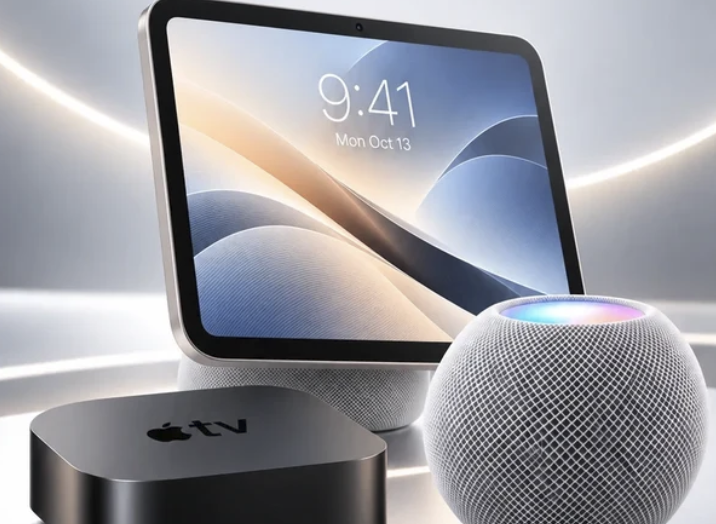
Apple used a single day in mid-October to refresh three pieces of living-room hardware at once, which leaves owners of any speaker, streaming box or smart plug wondering what to buy and when. The products share one theme, an upgraded Siri with AI features.
In this article we will explore what was announced, how each device fits a home, where the trade-offs sit, and how to decide without rushing into a pre-order.
The announcements in plain terms
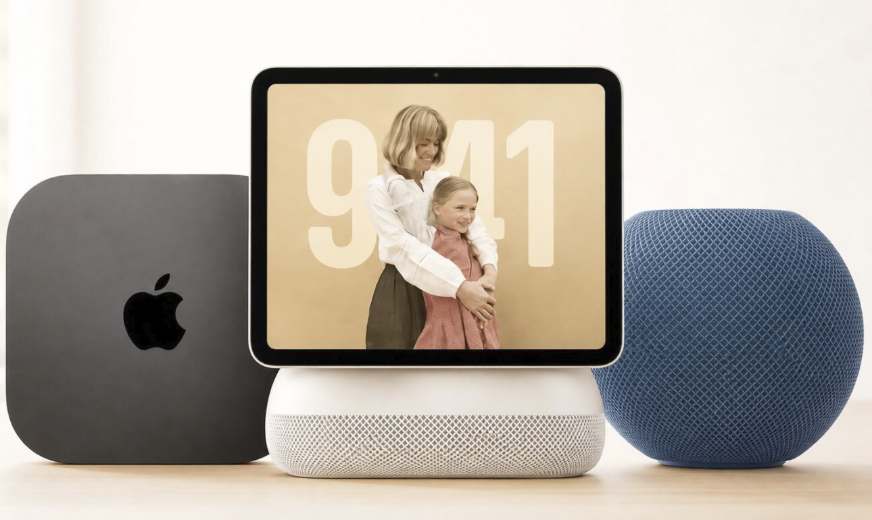
On October 13, 2026, Apple announced four products, according to MacRumors and T3. Three of them matter for most households: a new HomePod mini, a new Apple TV 4K, and a smart home hub called HomeView with a 7-inch touch display. The fourth, a Pokemon special edition of a Beats Pill speaker, is a collectible-style Bluetooth speaker that launches on October 15 in select countries, and it is a separate story from the home ecosystem.
Release dates are staggered, which is worth noting before you open the checkout page. The HomePod mini goes on sale Friday, October 30, while the Apple TV 4K and the HomeView hub both arrive Friday, November 13. Pre-orders were reported as open for all three. That two-week gap means a household buying the whole set will have the speaker first and the screen and streaming box later, so the first couple of weeks will be a half-finished setup.
Pricing is where the coverage is thin, and I would rather say so than guess. MacRumors reported the HomePod mini at $149 in the United States. T3 listed the HomeView hub at 299 pounds in the UK, while the MacRumors summary gave no hub price. For the streaming box, T3 only said it costs more than the model it replaces, with no figure. Treat anything beyond those numbers as unconfirmed until Apple’s own store pages and the first reviews are in front of you, and remember that US dollar prices rarely convert one-to-one into pounds, euros or other currencies once local taxes are added.
Why the Siri change is the common thread
All three devices are described as built around the newer, AI-powered Siri. In practice that matters more than any single spec, because it determines whether the products feel like faster versions of what you have or a different way of talking to your home. Voice assistants have a long history of sounding impressive in a demonstration and mediocre in a kitchen with a pan sizzling. A simple test, once reviews appear, is to look for reviewers who ask the assistant messy, real requests with background noise rather than tidy ones.
It is also reasonable to ask which features need an internet connection, which are processed on the device, and what happens to voice recordings. Those answers vary by feature and by region, and AI assistant rollouts frequently reach some countries and languages later than others. If you live outside the United States, check which languages and features are listed for your country before assuming parity with the launch videos.
HomePod mini as a small speaker with a bigger job
The new HomePod mini is the least expensive entry in this lineup and, for many people, the most sensible first purchase. Reports describe a $149 price, Siri with AI features, a light effect that Apple calls Sound Glow, and, per T3, four-speaker surround sound when paired up. That last phrase needs care. It most likely refers to using several of these small speakers together, and the Apple TV announcement mentions surround sound with four HomePods, which is a lot of money and wall space for a bedroom TV.
Who a small smart speaker suits
A speaker this size works best as a kitchen, desk or bedside companion. It handles timers, music, quick questions and smart home commands, and it takes up the footprint of a coffee mug. If you mostly want those things, a single unit is the right amount of product. If you want good music at party volume or a living room that sounds like a cinema, the physics of a small enclosure will limit you, and a stereo pair or a larger speaker will serve better than one small unit working hard.
The Sound Glow detail
The light effect is a cosmetic and feedback feature: a glow that responds to the assistant or to the music. It will appeal to some buyers and annoy others, especially in a dark bedroom. The question to ask is whether it can be dimmed or turned off, because a speaker that lights up beside a bed is a different proposition from one on a bookshelf. Early reviews are the place to find that out.
Placement mistakes to avoid
Small speakers sound best when they have a little space around them. Pushing one into a bookshelf slot, behind a monitor or against a corner usually makes voices muddy and the bass boomy. Keep it a few inches from walls, away from the microwave and the router, and at roughly ear height if you can. If you plan to pair two, place them a sensible distance apart rather than touching, and pick a room where the pair can stay put, since moving them around forces you to re-tune the setup each time.
Apple TV 4K as the box behind the screen
The new Apple TV 4K is the one device in the set that many households do not strictly need, so it deserves the most skepticism. According to the reports, it carries a newer processor with up to 50 percent faster CPU performance than the previous model, Siri with AI features, far-field microphones, and an updated Siri Remote with Find My support and Precision Finding, which helps locate a lost remote. It also supports surround sound with four HomePods, and it is priced above the outgoing model, according to T3.
Do you need a streaming box at all
Most current televisions already include apps for the big streaming services, so the real question is whether the TV’s built-in software is slow, abandoned by its maker, or crowded with ads. A separate box earns its place when the television is a few years old and sluggish, when its software no longer receives updates, or when you want one interface that follows you from living room to bedroom. If your TV is quick and you rarely complain about it, a streaming box is a luxury rather than a fix.
Remember too that a box depends on the apps you use, so confirm that your usual services are available for it in your country before you buy. A simple test is to time your current setup: how many seconds from pressing the power button to a show playing, and how often does the interface stutter? If the answer annoys you daily, a box will transform your evenings. If you cannot remember the last time you thought about it, save the money.
What a faster processor buys you
A quicker chip shows up as snappier menus, faster app launches and more headroom for future software, including the assistant features. It rarely changes picture quality, which depends on the television panel, the source material and your internet speed. Many buyers confuse the two. A very fast box connected to a modest television will not make the picture dramatically better; it will only make browsing smoother.
The remote deserves a mention
The remote has been a long-running complaint for this product family, and the addition of a way to find it when it slips between sofa cushions is the sort of small change that matters to a household. Precision Finding, as the reports describe it, points you toward a misplaced device. That sounds trivial until you have spent ten minutes before a film searching a living room.
HomeView and what a smart home hub does

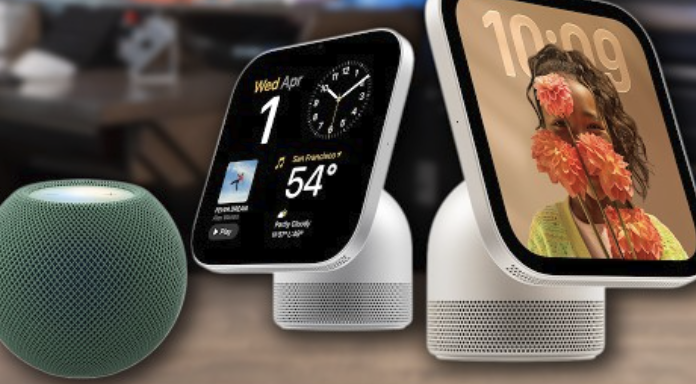
The hub is the new category in the group. According to the reports, HomeView has a 7-inch touch display, runs Siri with AI features, and recognizes faces so that a shared household screen can switch to a personal view when a particular person steps up to it. It is due November 13 and was reported at 299 pounds in the UK, though the MacRumors summary listed no price, so US pricing should be checked directly.
What a hub is for
A smart home hub is a central control point. It can show the status of lights, locks, cameras and thermostats, route commands, and sometimes act as the always-on brain that keeps automations running when your phone is out of the house. A display makes that control visible: you can glance at the front door camera or tap a scene without opening an app or speaking aloud, which suits a noisy kitchen or a hallway where you want to check the lock on the way out.
Face recognition and household privacy
The most interesting feature is also the one to think hardest about. A device that recognizes who is standing in front of it is convenient, and the personal view it unlocks may contain calendar entries, messages or reminders. Ask where recognition is processed, whether it can be disabled, and what a guest or a child sees. In a shared home, the difference between a household view and a personal view is a privacy boundary, so it should be something you can configure, not something you discover.
Whether you need one
Many homes get by without a hub. A modern phone, a speaker or two and a handful of well-chosen devices can run a home perfectly well. A display hub makes sense when several people need to control shared devices, when you have enough gadgets that opening an app for each is tiresome, or when you want a dedicated screen for a kitchen or hallway. If you have only a couple of smart bulbs and a plug, a screen on the wall is an expensive way to turn on a lamp.
Ecosystem lock-in and the standards question
Every product in this announcement works best with other Apple products, and that is the central buying consideration. A household built around iPhones, iPads and Macs gets the smoothest setup, tight integration with accounts and messages, and the most useful face-aware features. A household that mixes Android phones, Windows laptops and other brands will find that some functions are limited or missing, and some of them may not work at all.
Smart home standards in general terms
The smart home industry has spent years trying to make devices from different makers talk to one another through shared standards. In general terms, a device that supports the common cross-brand standard is far more likely to work with a hub from any manufacturer, while a device that relies on one company’s proprietary system will work only inside that company’s world. Before buying any smart bulb, lock or sensor, check the packaging for the standards it supports and for the specific hubs it lists, rather than assuming that a famous brand name on the hub guarantees compatibility.
The cost of switching later
Lock-in is not a moral failing of any one company; it is how convenience gets built. But it has a price, which is that leaving the ecosystem later means replacing hardware. Before you add a third HomePod or build a dozen automations, ask whether you expect to stay on the same phone platform for the next five years. If the answer is uncertain, favor devices that use open standards and keep your most important controls, like door locks and heating, in a system you can move.
A comparison to guide the decision
| Question | Small speaker | Streaming box | Display hub |
| Best for | Kitchen, desk, bedside | Slow or unsupported TVs | Shared homes with many devices |
| Needs a TV | No | Yes | No |
| Reported launch | October 30 | November 13 | November 13 |
| Biggest risk | Overbuying for a big room | Paying for what your TV already does | Privacy settings and unused screen |
| Skip it if | You never use voice | Your TV is fast and updated | You control two lamps |
Wi-Fi, Ethernet and the network behind everything
None of these products will feel good on a poor home network. Smart speakers, streaming boxes and hubs all depend on a stable local connection, and many of the complaints people blame on a device are really complaints about weak Wi-Fi in the room where it sits.
Wired is steadier for the streaming box
If a streaming box sits near the router, or if you can run a cable to it, a wired Ethernet connection is almost always steadier than wireless, because it avoids interference from neighbors, microwaves and thick walls. That matters most for high-quality video, which is sensitive to dropped packets and fluctuating speed. Check whether the box you are considering has an Ethernet port, since not every model in a streaming lineup does, and look at the specifications rather than assuming. If it does not, a good wireless setup with the router in a central, open location will still serve most households.
Speakers and hubs like a strong signal
Small speakers and displays use little bandwidth, but they need a reliable link to respond quickly. A speaker in a far corner of the house that pauses for several seconds before answering is usually dealing with a poor signal, not a slow processor. If you have dead spots, fix the network first, using a mesh system or a well-placed access point, before you spend money on devices that will depend on it. Placing the router off the floor and away from metal objects helps more than most people expect.
Keep the smart home on a sensible network
A smart home contains many small devices that rarely receive the same security attention as a phone or computer. Many routers offer a separate guest network, and putting cheap smart gadgets there keeps them away from your laptops and files. Keep device software updated, change default passwords, and remove devices you no longer use, since a forgotten gadget with old software is a weak point.
Three households and the choices they might make
Abstract advice only goes so far, so here are three ordinary situations and how the reasoning might play out. The names are invented, and so are the households; the point is the pattern of thinking.
A one-bedroom flat with a newish television
Someone living alone, with a television bought in the last couple of years and an iPhone, has little need for a streaming box or a hub. The small speaker is the interesting purchase: it can sit on a shelf, play music, run timers and control a few lamps. Spending a modest sum on that single device and ignoring the rest is a perfectly good outcome, and it leaves room to add things later if the assistant proves useful.
A family home with an old television and a busy kitchen
A family with a seven-year-old television that has stopped receiving updates, and a kitchen where everyone shouts requests while cooking, is the best case for the full set. The box fixes the sluggish television, the speaker covers the bedrooms, and a display in the kitchen offers a shared place for lists, timers and the front door camera. Even here, I would stagger the purchases: buy the box first, because the television is the daily annoyance, and see whether the kitchen screen still seems necessary after a month.
A mixed household with Android phones
When half the family carries Android phones, the calculation changes. The hub and speaker may still work for some tasks, but the smoothest features depend on Apple accounts and devices, and the people who cannot use them will feel left out. In that situation a cross-brand system built on open standards is usually the calmer choice, and it is worth checking what each product does for someone who does not use an Apple phone before paying for it.
A sensible order of choices
With three launch dates inside a month and a holiday shopping season approaching, it is tempting to buy early. Pre-ordering is reasonable if you are sure you want a product, but there is rarely a prize for being first.
Why waiting for reviews pays off
New hardware often has quirks that only appear after real use: a feature that launches later than promised, a bug in setup, or an assistant that behaves differently from the demonstration. Independent reviews appear around launch day, and the most useful ones come a couple of weeks later, when reviewers have lived with the product. If you can wait, the second wave of reviews is worth more than the first, and it often coincides with the early holiday sales.
Check the return policy before you click
Retailer return windows differ by country and by product, and holiday returns policies are frequently extended for items bought in November and December. Read the policy for the specific store you are using, and keep the packaging until you are sure. If you buy several items together, check whether they can be returned individually. A speaker that does not suit your room is easy to send back; a hub you have mounted on the wall and connected to a dozen devices is a bigger decision. It is also worth photographing your receipt and noting the date the window closes, so a busy week does not decide the matter for you.
Consider the second-hand and trade-in angle
Existing HomePods, older streaming boxes and previous-generation hubs hold some resale value, and selling or trading them in before a successor becomes common can offset the cost. Before you sell, reset the device fully and remove it from your account so that the next owner cannot see anything of yours. Do the same with any accessory that stores pairing information, and keep the original box and receipt if you are within a return period. If you are deciding what to do this autumn, work from the least expensive and most useful upward rather than buying the full set at once.
Start with the problem you have today
Ask which of three problems is real in your home: you want a better, smarter speaker in one room; your television software is slow or unsupported; or your household needs a shared control screen. Most people will find that only one of those is true, and that points to a single purchase. Buying the entire group to see what happens is expensive and leaves you with devices you do not use.
A practical sequence
For most households the order is the speaker first, because it is inexpensive, flexible and easy to return. The streaming box comes second, and only if your television justifies it. The hub comes last, after you have lived with the assistant for a few weeks and know how often you reach for a screen. By then, independent reviews and any early software updates will have told you whether the face-aware features work as promised.
Before you commit
Confirm that your phone platform supports the devices you want, that your network is solid, that the product is available in your country with the features you care about, and that you know the return window. Then decide whether the price, which for the hub and box may differ from the figures reported in the US and UK, still looks sensible in your own currency. If any of those checks fails, wait; the products will still be on sale in December, and probably with a better-informed community of owners behind them.
Read more about Techsipra
Frequently Asked Questions
When can I buy the new HomePod mini?
Pre-orders were reported as open, and the speaker launches on Friday, October 30. The streaming box and the hub follow on November 13.
How much does the new HomePod mini cost?
MacRumors reported a US price of $149. Prices in other countries differ with taxes and exchange rates, so check your local store.
Do I need an Apple TV 4K if my smart TV already has apps?
Not necessarily. A separate box helps mainly if your television is slow, no longer updated, or you want one consistent interface across rooms.
Does a smart home hub work with devices from other brands?
That depends on the standards each device supports. Look for cross-brand standards on the packaging and on the hub’s compatibility list before you buy.
Is Ethernet better than Wi-Fi for a streaming box?
Usually yes, because a cable avoids interference and gives a steadier connection. If your box has no Ethernet port, put the router in a central spot and keep the box in clear line of sight.
Should I pre-order or wait for reviews?
Waiting costs little and often saves a disappointment. Read independent reviews and check the return window before you commit.